Showing posts with label iPhone. Show all posts
Showing posts with label iPhone. Show all posts
Friday, August 10, 2012
iOS 6 Wifi Plus Cellular
So apparently Apple as introduced a "Wifi plus Cellular" option for data in iOS 6. The idea is that data can be sourced primarily via Wifi but if Wifi is spotty it can be backed up by using the cellular connection as well. While this idea sounds great I am not sure how well it will work in practice. Firstly, how many applications are designed to take advantage of such redundant connections resolving to different IP addresses and the like. Unless the switch over is transparent and instantaneous, more time may be lost with flipping and application recovery than is gained by the dual channel feature. Ideally I'd like to see the feature go further and say bind specific applications to either Cellular only, Wifi only or both. Consider the situation where you are using your phone for work, you'd like your work emails to come through immediately but you're probably not too concerned if Facebook updates slowly in the background. Secondly it will be interesting to see how the carriers respond to this, there are lots of efforts underway to push users off the RAN and onto Wifi, this setting will ensure that a user on Wifi still consumes cellular resources beyond those required for voice termination. This is particularly a factor in networks where voice is still circuit switched but data is packet switched.


Thursday, May 13, 2010
Apple Product Manager? Just say No!
So it occurred to me the other day as I was chatting to a former colleague what it is that makes Apple good at delivering products that your average consumer goes gaga over, makes the average bogan rush out and spend their baby bonus. The answer is simple.
Their Product Managers say no.
Admittedly it sounds simple. What? The key to their success is the ability to say no? Yup, that is it. They pick core features that they believe the customers will use and don't include all the extra stuff that I crave as an Engineer. Everybody thought they were stupid for releasing a new mobile phone with a camera that didn't support MMS.
How many MMS messages have you actually sent in your lifetime? I remember getting my first MMS enabled phone and sending a couple to friends, of course none of my friends could view them, or if they could they didn't look that good anyway. Every phone seemed to send them in a format that every other phone couldn't read. Overall I probably sent say 10 I would say.
What did the iPhone give you?
An easy way to email photos to people, or through the App store an easy way for you to upload it to FaceSpace or Twitter, or send it via IM. All of which worked better than MMS anyway, because there weren't compatibility issues.
Apple was widely criticised by the geekish elite, by every tech blogger from hear to the moon, except for the odd Apple Fan Boi everyone thought their shiney new phone wouldn't sell well because it offered limited features. But the vast majority of people, the people that Apple sell most of their products to don't care if you can't MMS, or can't transfer files via Blue tooth.
They want a phone they can use!
Initially they bought because it was a well designed phone that made the core functionality intuitive to use. Then more people bought it because you could add games easily, you could have fun with it and it was still easy to use.
So, what does this have to do with the Product Managers saying no? They stopped scope creep. Every Engineer that I can think of loves to add features, countless times I've heard
"Wouldn't it be cool if......"
in a lunch room or a project meeting. We all want to add features, I know I am guilty of it. In fact we wouldn't really be doing our job properly if we weren't thinking of what cool features we could out to what ever product we are working on at the time. I am certain that this also happens in the lunch rooms at Cupertino. The difference is that the Product Mangers don't allow the scope to creep, they also don't allow a partially completed feature in, think about Multitasking for a second.
When the iPhone was initially released there was a very clear statement that multitasking would not be allowed because it impacted battery life and performance too much. This indicates that multitasking was planned and even had been implemented and tested at least at the prototype stage. Clearly the Product Managers and Engineers weren't happy with it's performance and decided not to ship it initially. I'm willing to bet that there has been a team working on multitasking and getting it efficient and intuitve since the inception of the iPhone project and until the 3GS came out and iPhone OS4 allowed sufficient performance there was no mention of it.
Because the Product Managers said no.
Of course I am also willing to admit that there is a possibility that it is just Steve that has the power of veto, but there is still someone within the organisation that is saying it and that is the key.
Their Product Managers say no.
Admittedly it sounds simple. What? The key to their success is the ability to say no? Yup, that is it. They pick core features that they believe the customers will use and don't include all the extra stuff that I crave as an Engineer. Everybody thought they were stupid for releasing a new mobile phone with a camera that didn't support MMS.
How many MMS messages have you actually sent in your lifetime? I remember getting my first MMS enabled phone and sending a couple to friends, of course none of my friends could view them, or if they could they didn't look that good anyway. Every phone seemed to send them in a format that every other phone couldn't read. Overall I probably sent say 10 I would say.
What did the iPhone give you?
An easy way to email photos to people, or through the App store an easy way for you to upload it to FaceSpace or Twitter, or send it via IM. All of which worked better than MMS anyway, because there weren't compatibility issues.
Apple was widely criticised by the geekish elite, by every tech blogger from hear to the moon, except for the odd Apple Fan Boi everyone thought their shiney new phone wouldn't sell well because it offered limited features. But the vast majority of people, the people that Apple sell most of their products to don't care if you can't MMS, or can't transfer files via Blue tooth.
They want a phone they can use!
Initially they bought because it was a well designed phone that made the core functionality intuitive to use. Then more people bought it because you could add games easily, you could have fun with it and it was still easy to use.
So, what does this have to do with the Product Managers saying no? They stopped scope creep. Every Engineer that I can think of loves to add features, countless times I've heard
"Wouldn't it be cool if......"
in a lunch room or a project meeting. We all want to add features, I know I am guilty of it. In fact we wouldn't really be doing our job properly if we weren't thinking of what cool features we could out to what ever product we are working on at the time. I am certain that this also happens in the lunch rooms at Cupertino. The difference is that the Product Mangers don't allow the scope to creep, they also don't allow a partially completed feature in, think about Multitasking for a second.
When the iPhone was initially released there was a very clear statement that multitasking would not be allowed because it impacted battery life and performance too much. This indicates that multitasking was planned and even had been implemented and tested at least at the prototype stage. Clearly the Product Managers and Engineers weren't happy with it's performance and decided not to ship it initially. I'm willing to bet that there has been a team working on multitasking and getting it efficient and intuitve since the inception of the iPhone project and until the 3GS came out and iPhone OS4 allowed sufficient performance there was no mention of it.
Because the Product Managers said no.
Of course I am also willing to admit that there is a possibility that it is just Steve that has the power of veto, but there is still someone within the organisation that is saying it and that is the key.
Friday, April 23, 2010
Setting Up Wireless Distribution System
So, having moved from the trusty ridiculously slow and overpriced 3G internet connection to a super speedy ADSL2+ connection at home I ran into an unexpected problem.
Wireless signals and modern reinforced concrete buildings don't mix very well!
While I was sharing the 3G connection with a wireless router this was situated on the middle floor of the house, very centrally located and there where no issues with the signal strength any where in the house. Obviously with the new internet connection I needed to connect to a phone line, for some reason in this brand spanker of a house that I know reside there is no phone outlet on the middle floor of the house. So I had to either plug the new router in the living room, or in the bedroom. Given that the new connection came with a bonus SIP account and I'd purchased a voip enabled router it seemed to make sense to have this 'living' in the living room.
The Problem!
This however created a terrible, terrible problem not enough WiFi signal strength in the bedroom to use the iPhone in bed. I know this may not seem like a pressing problem but my partner seems to adore doing this (and it's growing on me a bit as well I must admit). So this, obviously, HAD to be fixed.
The Failed Ghetto Fix!

I attempted a ghetto reflector to boost the range of the router that I had picked up. I got the details off binarywolf.com which updated instructions from freeantennas. And I must admit that mine didn't look as good as the one pictured here because I have the craft skills of a clumsy 3 year old.
The Solution: WDS
So it was back to the web to search for solutions, WDS seemed to be the answer. I had toyed with Wireless distribution systems in the past, but only fancy commercial systems that used multiple radios etc etc to pull together different access points. In my various net wanderings I had read about WDS but never looked into it. There is a good background on WDS on Wikipedia if you want some more information.
Having discovered the possibility of WDS I was then resigned to the fact that neither the cheap ADSL/VoIP/WiFi router (Billion 7401R3) nor the 3G/Wifi router ('3' branded Huawei D100) I'd been using for the old connection would support it. I scoured the net for the manuals (oddly both were only available as RAR downloads...). Much to my delight I discovered that they both supported WDS.
The Setup
WDS required one major change to the current wireless setup. First of all it will only work with preshared keys in WEP or WPA and not the newer more secure WPA forms of encryption. FYI this is because there is no ratified standard for mesh network encryption although it looks like draft 802.11s will soon be ratified. Furthermore the 7401 doesn't even support it with WPA-PSK. So I had a downgrade the security from WPA2 to WEP, to give me some glimmer of security I enabled MAC filtering for the wireless devices we have in the house. So this will block a determined hacker for about 1/10th of a second.
The setup is pretty straight forward basically set the two APs to the same SSID, channel and key, then get the MAC of one router and copy it to the other and vice versa. Now as usual I didn't quite read the manuals properly and after having a quick skim decided that I could stumble my way through and it would be all good. This led to me stupidly setting the D100 to "bridge" instead of AP mode, a couple of days later trying to figure out why the signal kept dropping out it occurred to me as I re-read the manual while waiting for a site to load at work that I may have this wrong and once I fixed it all was good. So a friendly warning to all to set both routers to AP mode, not Bridge!
The Payoff
Happily laying in bed surfing on facePhone. :)
Wireless signals and modern reinforced concrete buildings don't mix very well!
While I was sharing the 3G connection with a wireless router this was situated on the middle floor of the house, very centrally located and there where no issues with the signal strength any where in the house. Obviously with the new internet connection I needed to connect to a phone line, for some reason in this brand spanker of a house that I know reside there is no phone outlet on the middle floor of the house. So I had to either plug the new router in the living room, or in the bedroom. Given that the new connection came with a bonus SIP account and I'd purchased a voip enabled router it seemed to make sense to have this 'living' in the living room.
The Problem!
This however created a terrible, terrible problem not enough WiFi signal strength in the bedroom to use the iPhone in bed. I know this may not seem like a pressing problem but my partner seems to adore doing this (and it's growing on me a bit as well I must admit). So this, obviously, HAD to be fixed.
The Failed Ghetto Fix!

I attempted a ghetto reflector to boost the range of the router that I had picked up. I got the details off binarywolf.com which updated instructions from freeantennas. And I must admit that mine didn't look as good as the one pictured here because I have the craft skills of a clumsy 3 year old.
The Solution: WDS
So it was back to the web to search for solutions, WDS seemed to be the answer. I had toyed with Wireless distribution systems in the past, but only fancy commercial systems that used multiple radios etc etc to pull together different access points. In my various net wanderings I had read about WDS but never looked into it. There is a good background on WDS on Wikipedia if you want some more information.
Having discovered the possibility of WDS I was then resigned to the fact that neither the cheap ADSL/VoIP/WiFi router (Billion 7401R3) nor the 3G/Wifi router ('3' branded Huawei D100) I'd been using for the old connection would support it. I scoured the net for the manuals (oddly both were only available as RAR downloads...). Much to my delight I discovered that they both supported WDS.
The Setup
WDS required one major change to the current wireless setup. First of all it will only work with preshared keys in WEP or WPA and not the newer more secure WPA forms of encryption. FYI this is because there is no ratified standard for mesh network encryption although it looks like draft 802.11s will soon be ratified. Furthermore the 7401 doesn't even support it with WPA-PSK. So I had a downgrade the security from WPA2 to WEP, to give me some glimmer of security I enabled MAC filtering for the wireless devices we have in the house. So this will block a determined hacker for about 1/10th of a second.
The setup is pretty straight forward basically set the two APs to the same SSID, channel and key, then get the MAC of one router and copy it to the other and vice versa. Now as usual I didn't quite read the manuals properly and after having a quick skim decided that I could stumble my way through and it would be all good. This led to me stupidly setting the D100 to "bridge" instead of AP mode, a couple of days later trying to figure out why the signal kept dropping out it occurred to me as I re-read the manual while waiting for a site to load at work that I may have this wrong and once I fixed it all was good. So a friendly warning to all to set both routers to AP mode, not Bridge!
The Payoff
Happily laying in bed surfing on facePhone. :)
Tuesday, April 20, 2010
Another win for the Enterprise Config Utility
The fiddling with my iPhone continues. Up until Sunday I was on a prepaid plan that I've used pretty much since I first got a mobile ten years ago. Hmm thats a little disturbing, but it wouldn't be far off almost exactly ten years ago. I feel a little older now. Anyway....
So for some reason, their is no Cellular Data Network tab (shown below) on my inherited iPhone.

So after poking around for a while.. it hit me, duh! Surely the Enterprise Config Utility can setup the APN etc as well. Sure enough there it is under the Advanced and it was as easy to get going as sticking in the Vodaphone APN which I pulled off there website and applying the profile.
Now I've got data on the run (Albeit at 2G speeds).
So for some reason, their is no Cellular Data Network tab (shown below) on my inherited iPhone.
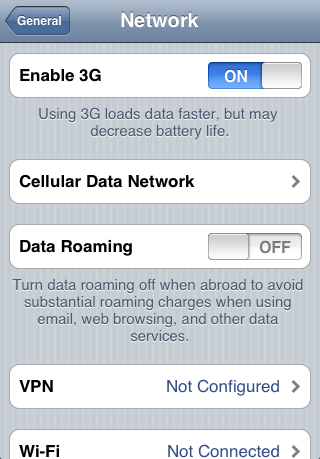
So after poking around for a while.. it hit me, duh! Surely the Enterprise Config Utility can setup the APN etc as well. Sure enough there it is under the Advanced and it was as easy to get going as sticking in the Vodaphone APN which I pulled off there website and applying the profile.
Now I've got data on the run (Albeit at 2G speeds).
Thursday, April 15, 2010
Stupid Wifi Key too hard to type in your iPhone? Use Enterprise Configuration Utility
So I've finally joined the Jobian masses and switched over to an iPhone. I'll start by going out there and saying I haven't become a massive fan boi or anything, its just that my phone was on its last legs and my better half wasn't using her Old School iPhone anymore. So now I have upgraded from my crappy N73 complete with non-functioning volume control requiring use of loudspeaker to hear a normal conversation, thus ensuring the entire room at work knows whatever I'm talking about, to an old school, original release iPhone. This does bring some disadvantages, OS 4 won't be supported when it comes out for example.
Anyway, the point of this post wasn't to inform you all that I've changed phones it was to introduce a handy tool that Apple has put together for enterprise iPhone configuration, that tool is the iPhone Configuration Utility, available from the Apple iPhone Enterprise Support page.
This tool was a life saver for me at work. I haven't gotten around to switching to a better mobile data plan so I'm avoiding data usage at all costs, so I need to be on a Wifi Connection to checkout anything. This is all well and good at home where I have a simple Wifi key but here at work its a pain in the arse because the Wifi key is in 64 bit HEX form. After a couple of failed attempts at entering the key manually I googled around for a better option and stumbled across this awesome tool. It lets you configure pretty much every setting item. You simply go through the menus in the app and then connect iPhone via USB cable and apply the config.
In fact I think downloading, installing and figuring out how to use the app was quicker than attempting to manually enter the key again.
Anyway, the point of this post wasn't to inform you all that I've changed phones it was to introduce a handy tool that Apple has put together for enterprise iPhone configuration, that tool is the iPhone Configuration Utility, available from the Apple iPhone Enterprise Support page.
This tool was a life saver for me at work. I haven't gotten around to switching to a better mobile data plan so I'm avoiding data usage at all costs, so I need to be on a Wifi Connection to checkout anything. This is all well and good at home where I have a simple Wifi key but here at work its a pain in the arse because the Wifi key is in 64 bit HEX form. After a couple of failed attempts at entering the key manually I googled around for a better option and stumbled across this awesome tool. It lets you configure pretty much every setting item. You simply go through the menus in the app and then connect iPhone via USB cable and apply the config.
In fact I think downloading, installing and figuring out how to use the app was quicker than attempting to manually enter the key again.
Subscribe to:
Posts (Atom)